

Modern Sony televisions are powerful entertainment systems, but like any electronic device, they rely on several internal circuit boards working together perfectly. When one of those boards fails, the entire television can behave unpredictably. If your Sony TV freezes, stops responding to the remote, refuses to recognize HDMI inputs, or produces sound without a picture, the problem often traces back to the main board.
At TVpartsToday, proudly known as The World's #1 Hub for DIY TV Repair, we help thousands of customers diagnose and repair these types of issues every year. One component that frequently appears in troubleshooting cases is the A-5069-646-A Sony Main Board, a critical control board responsible for signal processing, system software, and communication between your TV’s internal components.
Below is an example of the part in question:
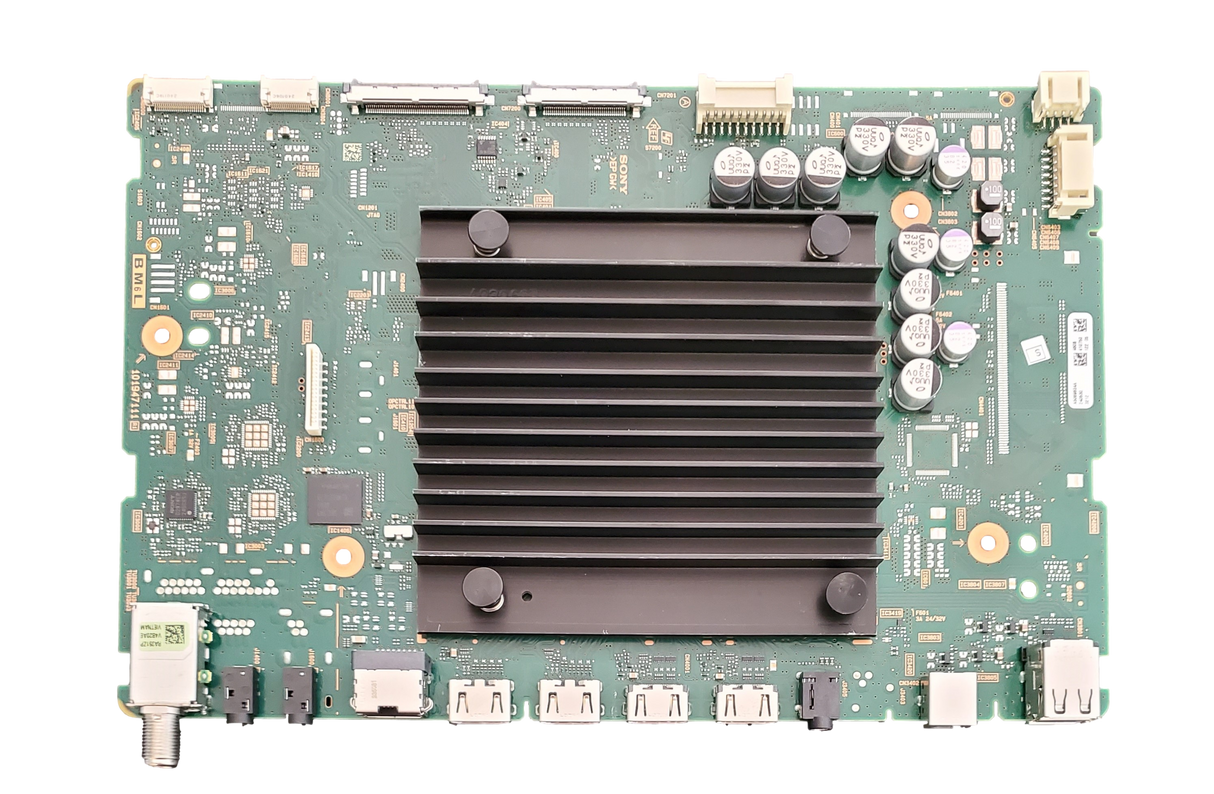
In this guide we will walk through the common symptoms of main board failure, explain how to identify the correct replacement part, and outline the steps required to install the A-5069-646-A Sony main board safely at home.
If you would prefer a visual walkthrough before starting your repair, our YouTube channel also provides helpful tutorials designed specifically for first-time DIY TV repairers. Watch our video on how to get started below:
Understanding the Role of the Sony Main Board
The main board functions as the central control system of your television. It manages audio and video processing, controls HDMI inputs, runs the smart TV operating system, and communicates with other boards such as the T-Con and power supply.
When this board begins to fail, the television may still power on but behave inconsistently. Because so many features rely on the main board, the symptoms can vary widely depending on which internal circuits are affected.
The A-5069-646-A Sony Main Board is commonly found in Sony televisions within the X900E series. Models that may contain this board include the XBR-55X900E, XBR-65X900E, XBR-75X900E, and XBR-49X900E, though production variations may exist.
Common Symptoms of a Failing Sony Main Board
A malfunctioning main board can create several noticeable problems during normal operation. One of the most common symptoms is a television that powers on but fails to display an image. In other cases, the screen may remain blank while audio continues playing normally.
Another frequent indicator is unresponsive HDMI ports. Devices such as gaming consoles, streaming sticks, or cable boxes may no longer be detected by the TV. Some users also experience remote control delays, menu freezing, or repeated system reboots.
Smart TV functionality can also suffer. Applications may fail to launch, crash during use, or lose network connectivity entirely.
TVpartsToday Tip: If your television still has working backlights and audio but fails to display video or recognize HDMI inputs, the issue is far more likely to be a main board problem than a damaged screen.
Performing a Power Reset Before Opening the TV
Before replacing hardware, it is always wise to rule out temporary software issues. A simple power reset can clear stored electrical charge and sometimes restore normal operation.
Start by unplugging the television from the wall outlet. Press and hold the physical power button on the TV itself for approximately thirty seconds. Leave the television unplugged for an additional minute before reconnecting the power and turning it back on.
If the symptoms remain unchanged after this reset procedure, the main board may indeed require replacement.
Distinguishing Main Board Failure from Other Board Problems
Not every display issue originates from the same component. Understanding how the main board interacts with other boards can help isolate the root cause more accurately.
When a television produces sound but no picture, the issue may originate from either the T-Con board or the main board. Because the T-Con board directly controls how image data reaches the panel, many technicians recommend checking or replacing it first when audio is present.
If the television powers on and the backlight illuminates but no input signals are recognized, the main board is usually responsible. The board manages all HDMI communication, so port failures often point directly to it.
When the TV fails to power on entirely, the power supply board is often the culprit. However, in some Sony models, a defective main board can also interrupt startup and create similar symptoms.
TVpartsToday Tip: A quick flashlight test can help determine whether the backlights are functioning properly. If the backlights are working and the display remains dark, the issue often lies with either the main board or the T-Con board.
Identifying the Correct Sony Replacement Part
Sony televisions are somewhat unique when it comes to part identification. Unlike many manufacturers, Sony frequently uses board numbers printed on barcode stickers to identify replacement components rather than clearly labeling the part number directly on the circuit board.
When examining the board inside your TV, you may notice several different numbers printed across the board’s surface. Most of these numbers are internal manufacturing identifiers and do not guarantee compatibility with your television.
The correct identifier typically appears on a white barcode sticker attached to the board. This number often follows a format such as A#######A or A-####-###-A. When this number is entered into the TVpartsToday system, it corresponds to the proper replacement part.
Because of this naming system, identifying Sony boards can sometimes be confusing. If you are unsure which number to use, sending a clear photograph of the board and its label can help confirm compatibility before ordering.
TVpartsToday Tip: The number printed on the sticker is the most reliable identifier. The large numbers printed directly on the circuit board should not be used when searching for replacement parts.
Installing the A-5069-646-A Sony Main Board
Once you have confirmed the correct replacement part, installing the new board is a straightforward process that most DIY repairers can complete in less than an hour.
Begin by unplugging the television and placing it face down on a soft surface such as a towel or blanket to protect the screen. Remove the screws securing the rear panel and carefully lift the panel away from the TV.
Locate the main board, which is easily identified by the HDMI ports and other input connections. Carefully disconnect each ribbon cable and wiring harness attached to the board. After removing the mounting screws, lift the board out of the chassis.
Position the replacement board in the same location and secure it with the original screws. Reconnect each cable exactly as it was before removal, then reinstall the rear panel.
TVpartsToday Tip: Taking photographs before disconnecting cables can make the reassembly process much easier and prevent connection mistakes.
Completing the Sony Firmware Update
Unlike many other television brands, Sony main board replacements typically require a firmware installation before the television can operate correctly with the display panel.
After installing the new board, a firmware update must be performed using the correct Sony software package for your specific model. This process allows the main board to synchronize with the panel and internal components.
Fortunately, the process is straightforward when following a proper guide. Our detailed Sony firmware update tutorial explains how to prepare the update file, load it onto a USB drive, and complete the installation safely.
The A-5069-646-A Sony Main Board plays a central role in the performance of many Sony televisions. When this board fails, symptoms can include HDMI port failures, system freezing, missing video output, or malfunctioning smart TV features.
Fortunately, replacing the board is often a practical and affordable solution that can restore a television to full functionality without requiring professional repair service.
At TVpartsToday, The World's #1 Hub for DIY TV Repair, our goal is to make television repair accessible to everyone. With accurate part identification, clear guidance, and the right replacement components, many common Sony TV problems can be resolved at home with confidence.
And remember, when ordering replacement boards, always match the exact part number rather than relying on model numbers or printed board identifiers. Taking that extra step ensures compatibility and helps guarantee a successful repair.
Need Help?
If you’re still unsure about the issue or need to replace a part, reach out to TVpartsToday. We can help you identify the exact cause of the problem and provide the right replacement part!
Would you rather watch a video? Check out our helpful Troubleshooting 101 playlist over on YouTube!
Would you rather chat with a seasoned repair expert? Head on over to our TVRepairHelp subReddit!
We also have a helpful chatbot called the Wizard of TV Repair that may be of assistance!
Need help finding the right board or part?
Call us at 930-212-1975 or browse our inventory online.
DIY-friendly parts, fast shipping, and expert support – only at TVpartsToday, the World's #1 Hub for DIY TV Repair!